Senior UX Researcher

I uncover
the unsaid.

Nine years researching humans across hardware, consumer apps, enterprise software, and voice interfaces across more than ten countries. Foundational research, cross-cultural field work, and strategic recommendations that changed what got built.

Durba Chatterjee
Previously at
Google · SAP · Ola · HP
9Years in UX Research
10+Countries Researched
3International Design Awards
$1M+In At-Risk Costs Prevented
Key Impact at a Glance
$150K Annual Vendor Saving via HP Lab
30% Faster Study Turnaround
30-40% Increase in Stakeholder Involvement
20-30 Researcher Days Saved via AI Workflows
50+ Studies Coordinated and Led
4 Companies, 4 Industries, 1 Consistent Outcome

"Research that only confirms what you already believe is not research. It is expensive decoration."

I grew up wanting to read past the headline. Journalism, English literature, teaching — everything I was drawn to involved the same question: what is actually happening here, and why does it matter to the person living it?

I never planned to become a UX researcher. But looking back, the path makes sense. That same instinct keeps you in a conversation long enough to hear what someone is not saying. You go into a print shop in Gurgaon, or a help center queue in Mumbai, and you try to understand what is actually happening, not what everyone assumed was happening. The gap between those two things is where the work lives.

I believe there is no such thing as an irrational user. Everyone carries a point of view built from their circumstances, their history, the specific morning they are having. The job is not to judge that. It is to understand it well enough to do something useful with it.

I have sat across from a participant so intimidated by the room that every answer was "I don't know." I have been in a help center full of drivers who redirected months of frustration directly at us. Fear creeps in at those moments. Then I remember: if something breaks in a session, it usually means something needed to be fixed in the product.

Outside of work, I read. I am quietly curious about how a single person builds an entire world from imagination, and how others inhabit it as if it were real. I suspect that curiosity is not entirely separate from the research. It is the same question, asked differently.

Me as a Researcher

Quantitative Surveys A/B Testing Card Sorting SUS NPS Task Analysis
Mixed Methods Usability Testing Piggyback Interviews Journey Mapping Diary Studies
Qualitative · Primary Practice Field Research Contextual Inquiry Ethnography In-depth Interviews Focus Groups Shadowing Spaces Research

I work across both ends of the spectrum. Qualitative research is where my curiosity feels most alive, the kind of work where you sit with someone long enough to hear what they are not quite saying yet.

01
Making findings easy to act on

Good research sometimes contradicts what a team hoped to hear. The skill is presenting it so clearly that the team can do something with it, without feeling blamed for the gap.

02
Research inside the business

Every research question sits inside a product decision, a budget cycle, a roadmap conversation. Researchers who understand that context ask better questions and get more of their work acted on.

03
Staying useful as things change

The users I have spent nine years studying are changing how they behave, and AI is a significant part of why. Staying ahead of that shift is the most interesting research problem of the next few years.

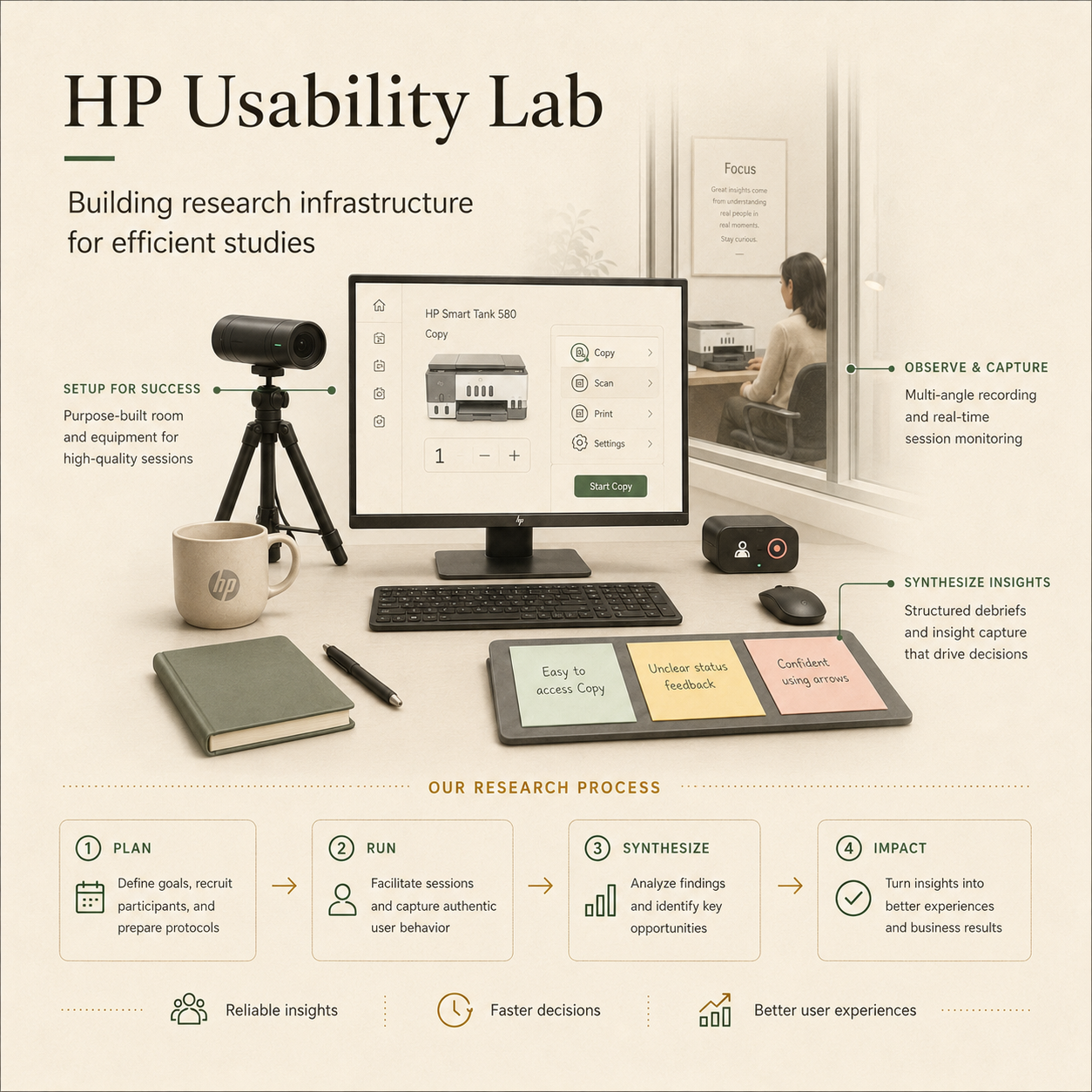
HP Usability Lab
HP Usability Lab, India
Building the Lab That Made It Possible

The business case was built on a straightforward ROI argument: external vendors were costing $150K annually with turnaround times that created sprint bottlenecks. An in-house lab would pay for itself within the first year. It was built lean, without expensive equipment, relying entirely on process design and research infrastructure that scaled at low cost.

The more significant shift was qualitative. Vendor-run studies felt clinical and scripted. Running sessions in-house gave the flexibility to cross-reference products and experiences not on the discussion guide, which consistently added downstream value. Stakeholder involvement in sessions increased by 30 to 40%. People who watched a session needed far less convincing than people who read a report.

$150KAnnual vendor costs saved
30%Faster study turnaround
40%Studies conducted internally
30-40%Increase in stakeholder session attendance

Career Journey

2017
Google Research Operations
Coordinated 50+ studies across Google product teams, building research operations discipline.
2017-19
Promoted to Google NBU Researcher
Moved into UX Research for Google Assistant and Android Go, studying first-time smartphone users, literacy, language, trust, and onboarding in India.
2019
SAP SuccessFactors Researcher
Researched complex enterprise HR workflows using usability testing, card sorting, A/B testing, and remote research.
2019-20
Ola Driver Researcher
Led rider and driver research in real-world mobility contexts, uncovering behaviour under pressure and translating it into product direction.
2020-23
HP SOHO Printer Portfolio Researcher
Owned research for HP's SOHO printer portfolio in India, running global hardware studies across multiple markets and printer lines.
2023
Promoted to Senior UX Researcher at HP
Moved into strategic ownership of HP Control Panel research across Emerging and Developed Markets.
2023-26
HP Control Panel Research Lead
Shaped next-generation small-screen printer experiences while building in-house research capability and AI-assisted research workflows.

Selected Work

Four studies. Each one changed something that would not have changed without the research.

01
HP India 2023 to 2025 Field Research Concept Validation

When the research said stop.

HP had a P0 mandate to enter the PVC card printing market. Research across 5 cities and 30+ jobbers revealed the product would hurt the brand before it helped it. An estimated $1M+ in at-risk launch investment was protected.

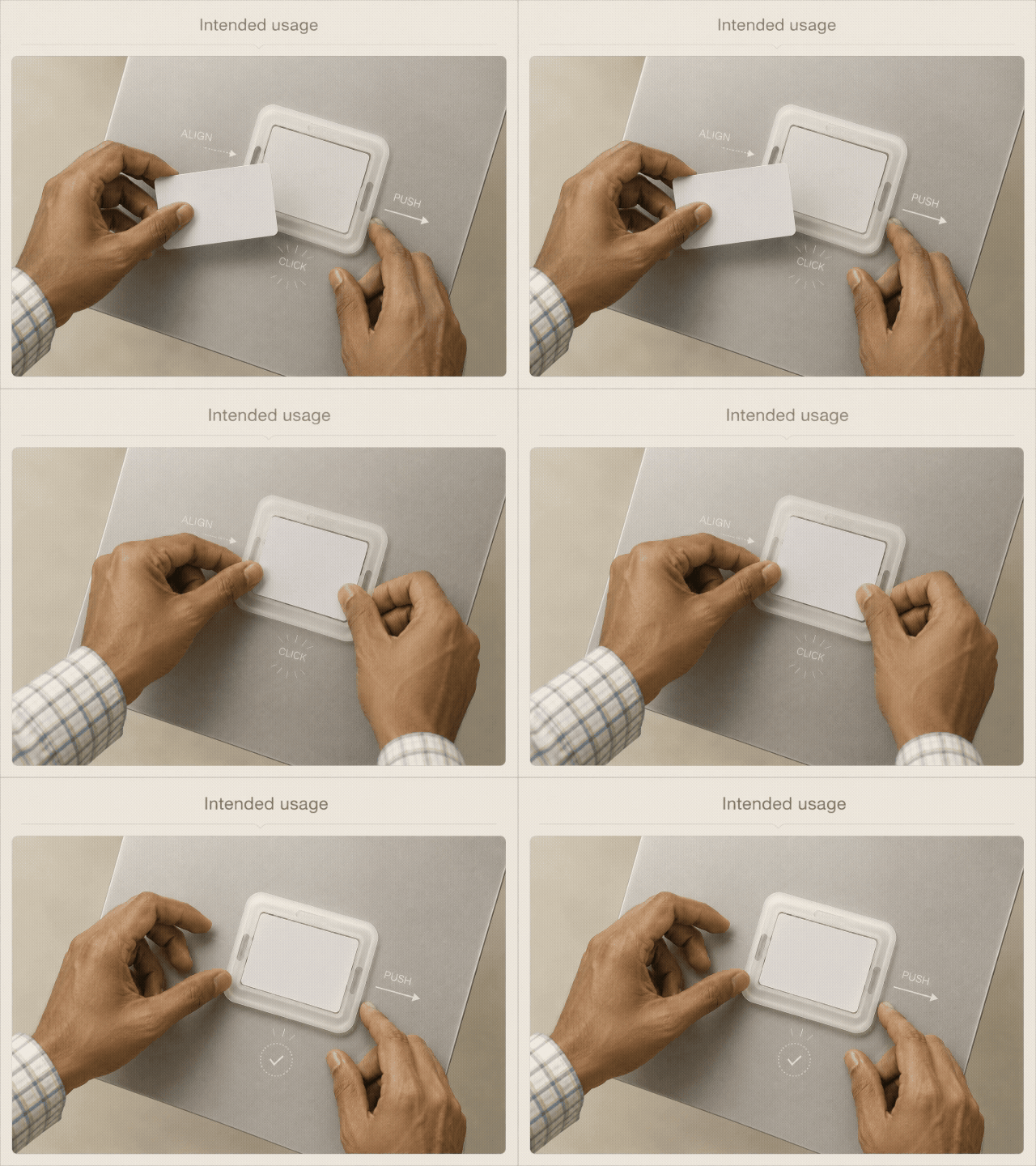
Shop context photos and annotations

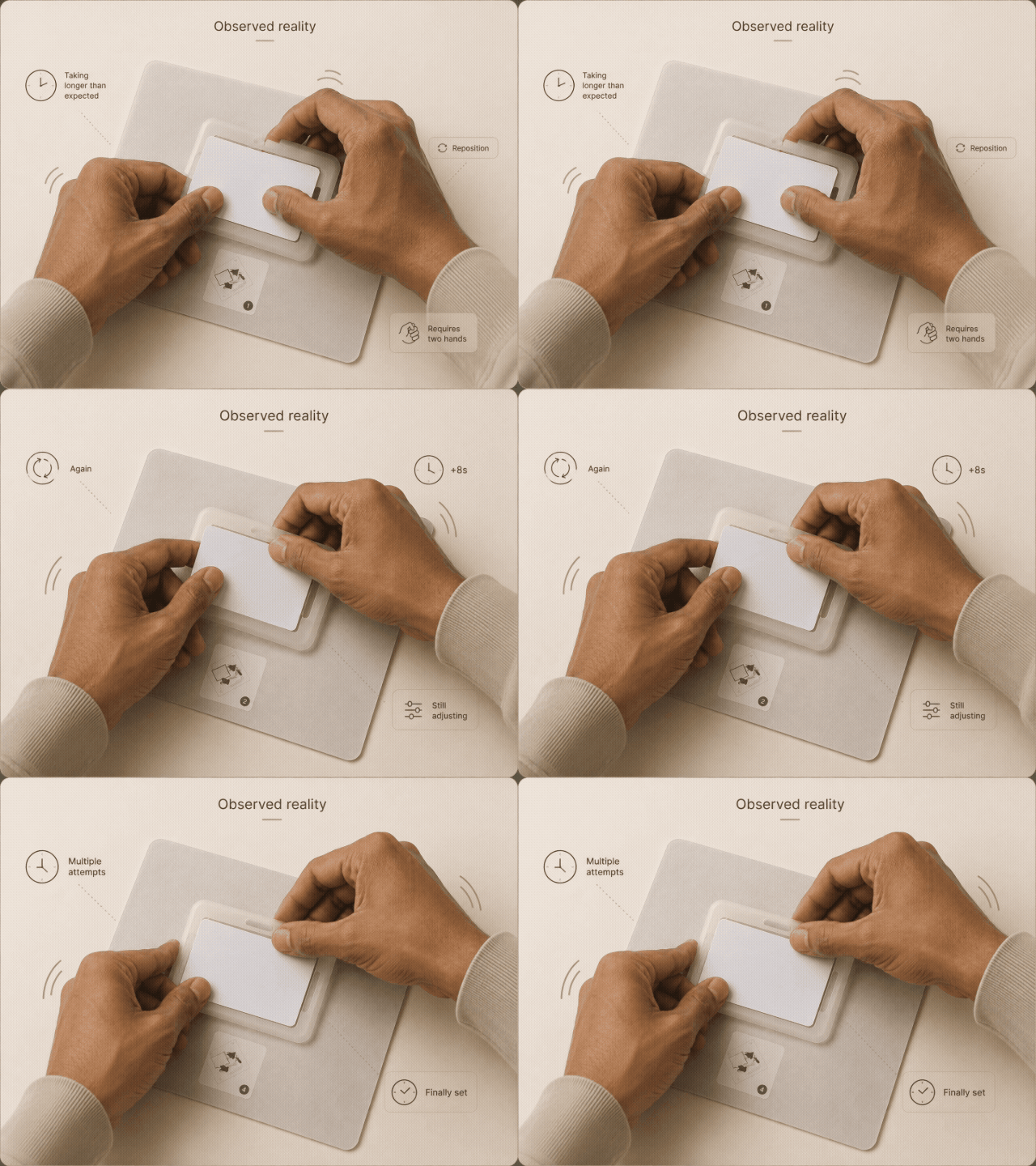
The field images show the operational friction behind the launch recommendation: card setup needed repeated hand adjustment, disrupted the jobber workflow, and exposed a gap between the intended mechanism and real shop-floor use.

PVC card carrier mechanism The Mechanism
Participant loading PVC card during usability session The Session
What the product required

Align card with carrier slot, press firmly to lock, insert carrier into tray. Single slot only. One card at a time. Each load took over 5 minutes per card under observation conditions.

What the session revealed

Two hands. Full concentration. In a print shop where customers wait and switching costs are zero, this friction costs revenue. Participants did not struggle because they misunderstood the product. They struggled because the mechanism was harder than the alternative they already used.

My Role Lead UX Researcher, end to end
Scope Brief framing, methodology, field execution across 5 cities, synthesis, report, stakeholder recommendation
Research Phases Phase 1: 5 cities, 30+ jobbers and dealers. Phase 2: Bangalore retest, 20 participants.
Methods Contextual observation · In-depth interviews · Concept testing
The Situation

A dominant competitor owned the PVC card printing market in India through the absence of competition, not loyalty. Jobbers printing hundreds of cards daily in shops smaller than 10sqm were waiting for an affordable alternative. HP's price point landed well. The mandate was P0: move fast.

What I Found

The appetite was real, but fixing a PVC card onto the HP carrier took significantly more time and effort than the competitor's workflow. Jobbers were direct: "The competitor gives me 2 slots in the tray. This gives just one. I would rather go for the more expensive one, as in the long run that is more beneficial." In shops where customers wait, the slower process had an immediate cost: "I run a very small shop. If I have to spend so much time, I will lose out on customers which will affect my business." A second phase in Bangalore confirmed the problem persisted. One jobber shared a video circulating on WhatsApp: a Tier 3 city shop owner had already built his own workaround, and it looked remarkably similar to HP's engineered solution.

What Changed

I gave the team a clear recommendation: this product is not ready, and iterating on a flawed mechanism risks damaging brand trust in a first-entry market. The recommendation to pause was mine. The programme was paused. The roadmap was reconsidered. An estimated $1M+ in direct launch costs was protected.

"Stopping a product from launching badly is not a failure of research. It is research working exactly as it should."

30+Jobbers and Dealers
5Cities Visited
2Research Phases
$1M+At-Risk Costs Prevented
02
HP India and Global 2020 to 2026 Self-Initiated Mixed Methods 3 Studies 4 Markets

The evolution of a control panel.

HP's control panel was already being redesigned when I started attaching my own research questions to the process. Over three years, I added probes to commissioned studies, ran independent intercepts, and built an evidence base that nobody had formally asked for. When a significant cost-cutting mandate arrived in 2025 and the team needed answers quickly, that accumulated research became the foundation for everything that followed.

My Role Lead UX Researcher across all three studies
Scope Research strategy, study design, participant recruitment, moderation, synthesis, and design recommendation
Studies and Participants 3 studies over 3 years. 50+ participants across India, US, Singapore and China.
Methods External participant testing · Moderated IDI · A/B testing · SUS · NPS · Task analysis
The Situation

The redesign of HP's control panel for low to mid-range printers had been an ongoing project across several years. My involvement began as a contributor to that process, running studies alongside the commissioned work and adding research questions that went beyond the brief. Over time, a picture built up: what users needed, what they consistently struggled with, and what the design team had not yet been asked to address. In late 2025, the mandate shifted significantly. A cost-cutting directive required the team to either redesign using a less expensive display or revert to an older model already in the market. When the pressure was highest and the timeline was tightest, the research was already done.

The Image That Tells It
HP Control Panel Research
Studies, versions, and prototype logic

Across prototype rounds, the core question was not which layout looked better, but which control model helped users recover from ambiguity on a two-line screen with limited visual guidance.

Study 01 of 03
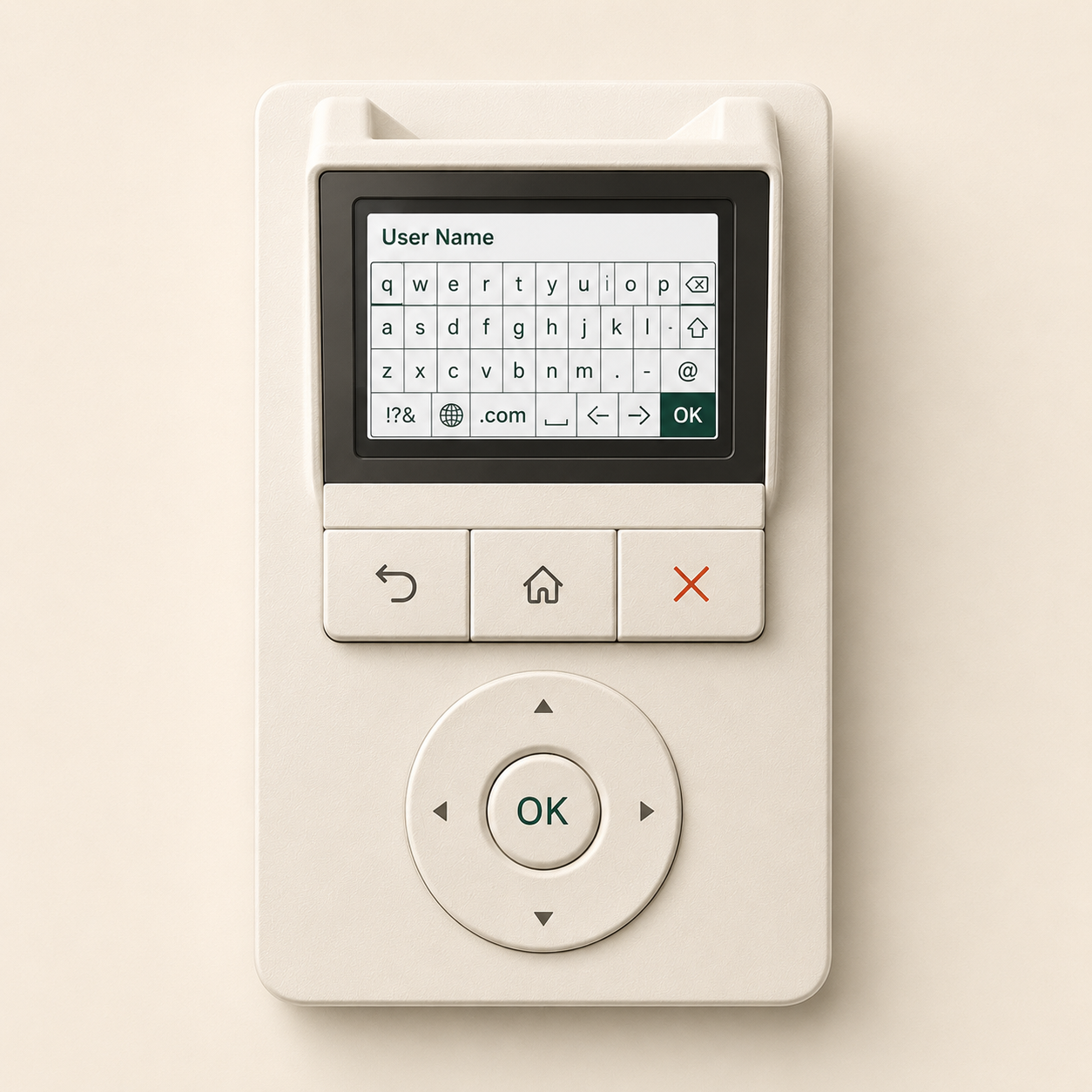
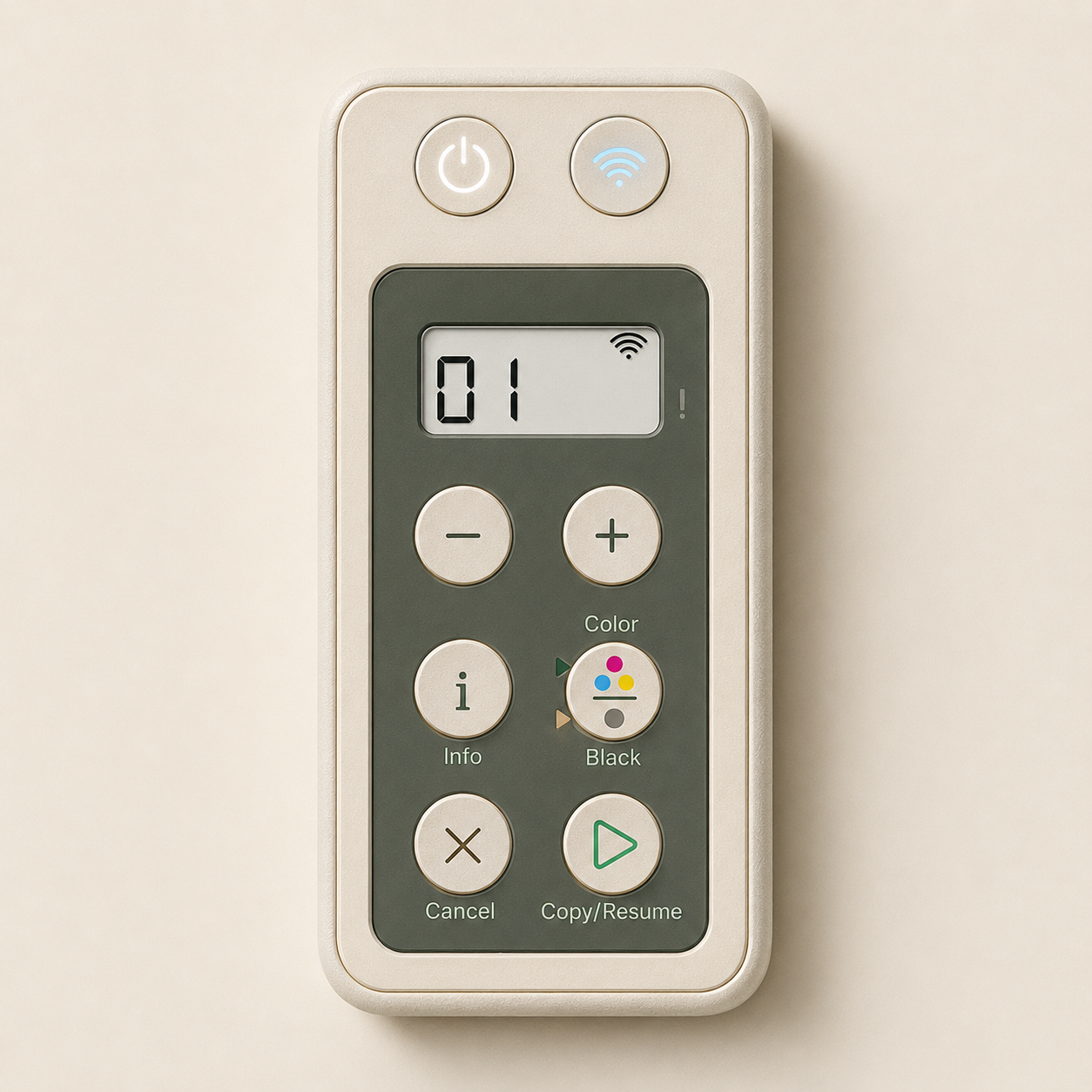
Hybrid dial-navigation control panel concept
Hybrid
Dial Navigation · 2022 · India and US

The Hybrid UI explored a fundamentally different interaction model. Rather than discrete buttons, users would navigate using a dial-and-tumbler system, scrolling through options to select them, much like an iPod or a smart TV remote. Tested with external participants in India and the US, covering the core use cases: signing in with a username and password, printing a locked document by entering a PIN, and resetting the date and time.

Participants who owned smart TVs or had prior experience with scroll-wheel devices adapted quickly. Those without that reference frame, a significant proportion of the target market, struggled. Sign-in was the sharpest pain point: entering a username character by character using a dial felt slow and error-prone, and a single mistake required starting over entirely.

"Typing in a password is tedious. It would take too long with my name." (US participant)

"Once you get used to it, it is not difficult at all. Initially we may require some kind of help." (India participant)

That qualifier, once you get used to it, became the thread I pulled on across every subsequent study. Post-task ratings were broadly positive. The recordings told a different story. I noted this explicitly in the synthesis: satisfaction scores alone would have painted a rosier picture than the observed behaviour warranted.

Why it did not go into production

The dial interaction required prior experience with analogous devices to use fluently. For a low to mid-range printer designed to work without instruction, a learning curve that depended on what else a user owned was not viable. The interaction model also felt dated: the physical buttons on the dial were stiff and difficult to press, adding friction to every task. Too complex for the user base it was built to serve.

Study 02 of 03
Essential Basic icon-only button control panel
Essential
Icon-Only Buttons · 2024 · Singapore, China, India and US

By 2024, the design direction had shifted toward a more button-based approach. The Essential Basic design was HP's attempt at a minimal, modern control panel: backlit, touch-sensitive buttons with iconography but no printed text labels. The anchor study was run in Singapore, a deliberate choice that allowed bilingual participants (English and Chinese-speaking) to evaluate the panel across two label languages simultaneously. A follow-up study of 16 sessions in India pointed to the same conclusion.

Essential Basic scored highest on perceived modernity. It also scored lowest on first-attempt task success. Icon-only buttons caused consistent misidentification: the start button was described as play, forward, and feed paper across different participants. Scored on a standardised usability scale, Essential Basic without modifications rated 75.5, below both benchmarks and below HP's own internal average.

The turning point came when plus/minus copy buttons were added alongside clear text labels. Task success improved significantly and the panel became the most preferred option overall.

"Just with the labels, everything has changed. Just the labels made everything much clearer."

Why it did not go into production

The modified version of Essential Basic was the most preferred design tested. But the modifications required to make it work, specifically the additional plus/minus hardware buttons, drove production costs above the threshold for low to mid-range printers. The cost saving that justified the minimal design was eliminated by the changes needed to make it usable.

Study 03 of 03
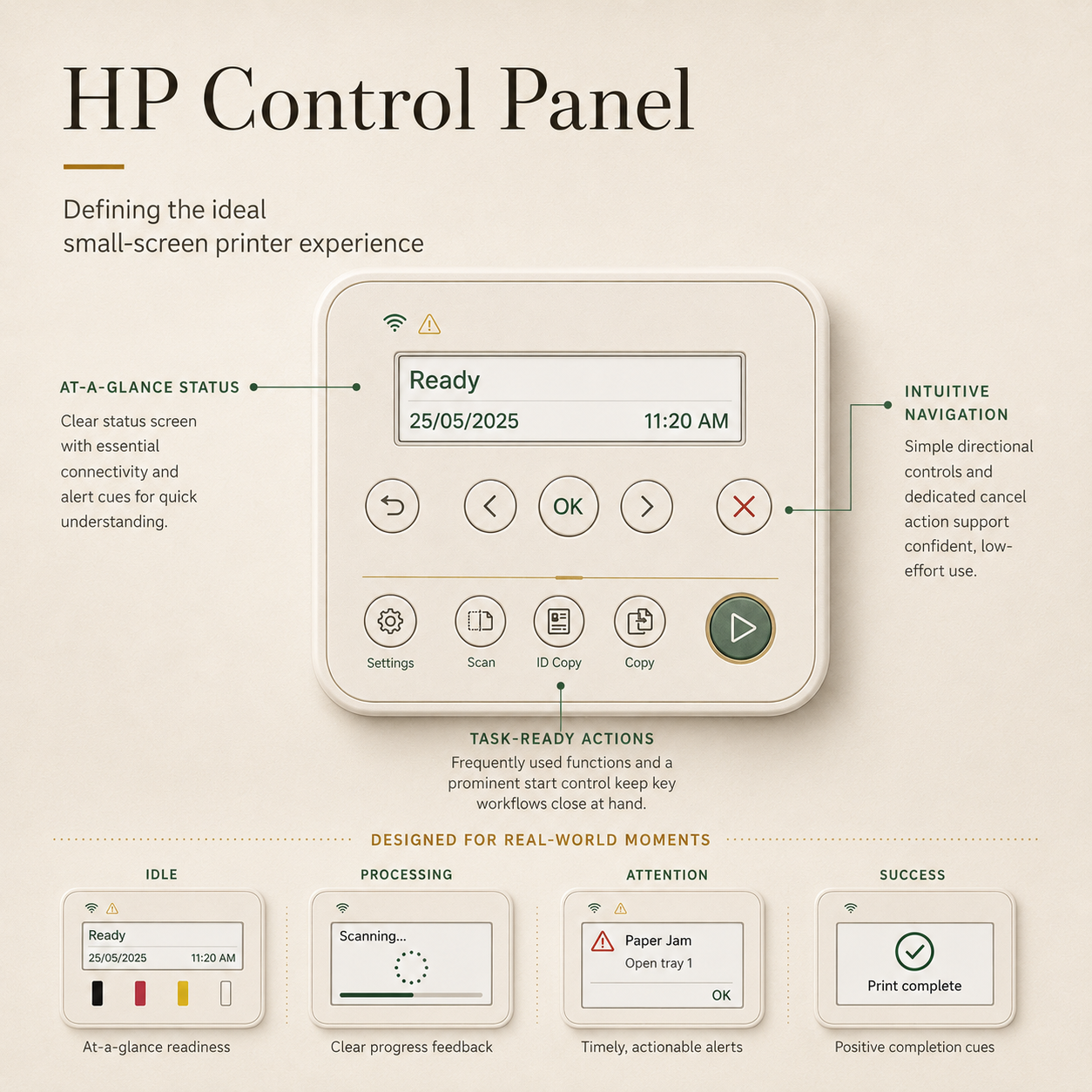
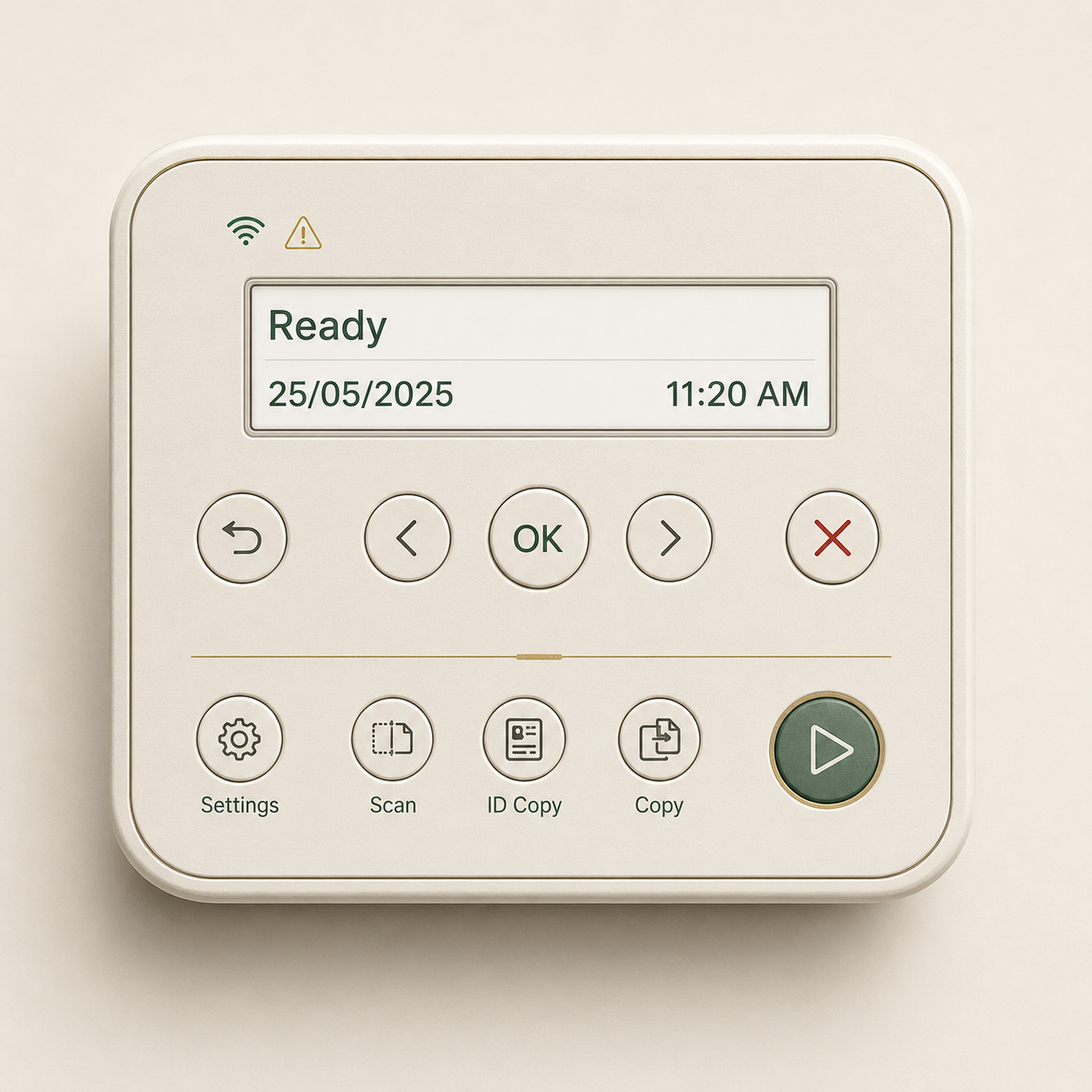
Final shipped control panel with 2-line display and labelled buttons
Final
Shipped Direction · 2025 · India and US

With a directive to either build a new cost-effective control panel or revert to an older 2-line display already in the market, the team needed a clear answer. Two new prototypes were tested alongside HP's own legacy control panel and a competitor's current model. Option 1 was minimal: a central D-pad, clean lines, no on-screen directional cues. Option 2 made a different choice: left-right navigation with an OK button, upfront shortcut buttons for copy, scan, and ID copy, and clear text labels throughout.

In Bangalore, I ran moderated sessions directly. In the US, a local co-researcher ran parallel sessions to the same protocol. Option 1 made a strong first impression. Under task conditions, it struggled. Without on-screen directional cues, users were unsure which way to navigate.

"I don't want to walk to the printer and think, how do I make this work." (Participant, Bangalore 2025)

Option 2 was the clear preference on task completion. The upfront action buttons removed a layer of navigation for common tasks. The labels removed guesswork.

When the two prototypes were too close to call on qualitative feedback alone, task completion and time-on-task data resolved it. Users could articulate preferences but not performance. The data made visible what conversation alone could not.

Why this shipped

Button-dominated, 2-line display, clear text labels, no icons requiring interpretation. Production costs came in within the mandate. Participants across age groups and literacy levels said it could be used by anyone: their children, their elderly parents, someone encountering a printer for the first time.

Key Finding from Final Study

A competitor's control panel outperformed HP's own legacy design on every usability measure, despite being older and less visually refined. Better labels and logical button grouping outweighed aesthetics when users were under task pressure. That finding alone changed how the design team framed the problem: the question was not how to make the new panel look modern. It was how to make it work without instruction.

Findings across markets

The market-level pattern was consistent: users needed clearer labels, stronger directional cues, and better button-function mapping before the hardware interaction could feel confident.

01
Discoverability is not usability

Dial navigation was discoverable. Users found it eventually. But finding something and using it fluently under real conditions are not the same thing. The dial placed a learning tax on anyone without analogous device experience.

02
Text labels were the single most impactful variable

Across every study and every market, labels were the factor that most reliably improved both task success and user confidence. Participants described them as worth paying for.

03
One button cannot mean two different things

The dual-purpose Start button was a systematic failure point in every study it appeared in. Entry-level users cannot hold conditional button behaviour in memory during a real task. One action, one button.

04
Icon-only controls failed at first contact

Internationally recognised icons were understood. Function-specific icons were not, regardless of design quality. This held across India, the US, Singapore, and China.

05
Plus/minus copy buttons were an unambiguous win

Near-universal first-attempt success and spontaneous positive feedback across every market tested. A small hardware decision with a disproportionate usability impact.

06
Ratings and behaviour told different stories

Participants consistently rated minimal, modern designs as preferable while performing worse on them. Across all three studies. Across all four markets. Relying on ratings alone would have produced the wrong recommendation every time.

Across all iterations, one truth held. Printer users want something that works the first time, without instruction.

"Just with the labels, everything has changed. Just the labels made everything much clearer."

"Not a gadget. A tool."

50+Participants
3Studies over 3 Years
4Markets
03
Ola Cabs India, 2019 to 2020 Field Research Service Design App Redesign

Every queue outside a help center was a product failure.

One study from a body of 15+ research projects at Ola. This is the one where a queue of drivers outside a physical building told me more about a digital product than any usability session could.

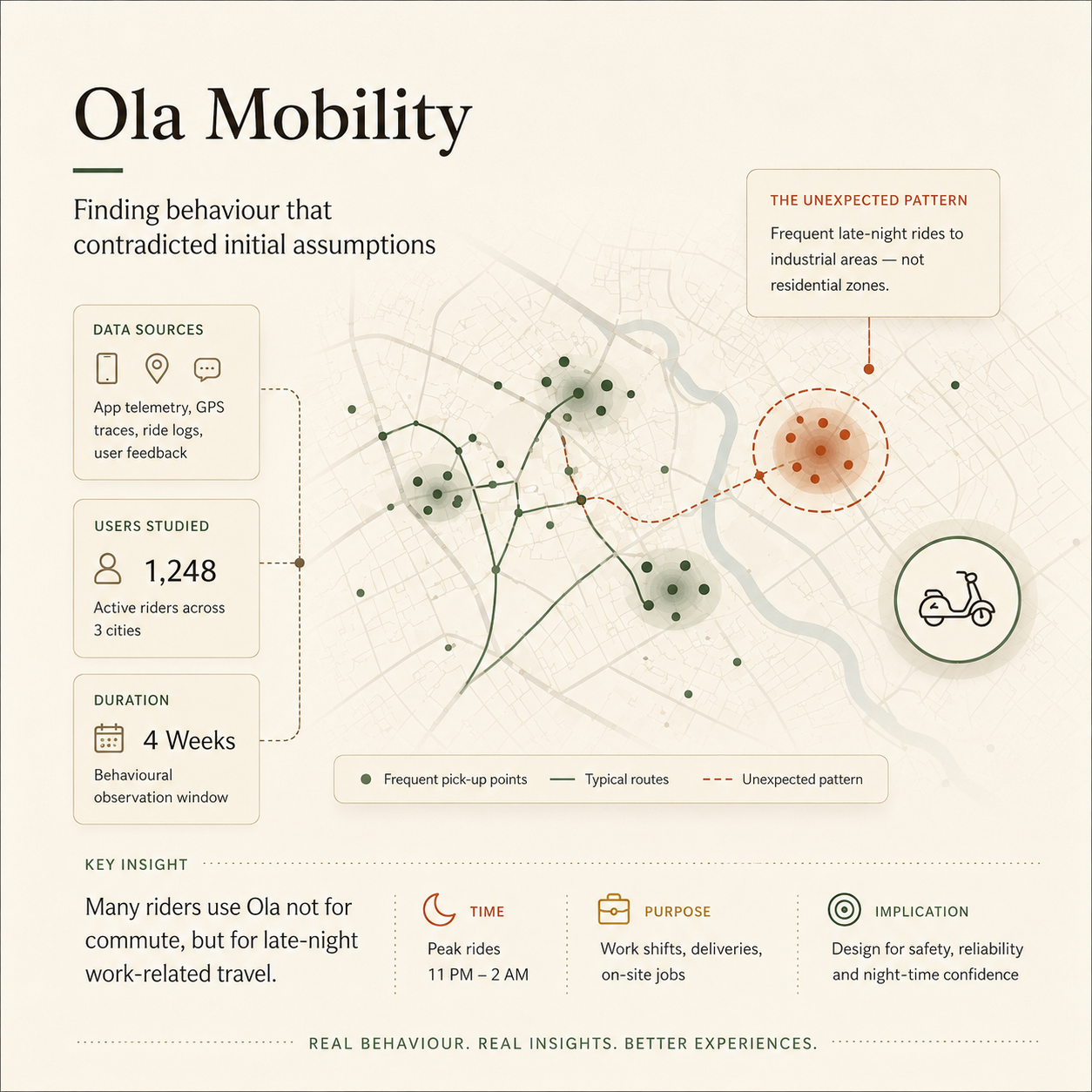
Ola Mobility Research
My Role Lead researcher: brief framing, methodology, field execution, synthesis, report, and stakeholder communication
Scale 186 partners, 5 cities, 15 days of fieldwork
Methods 1:1 interviews, focus group discussions, shadowing, spaces research
Outcome App redesign committed. 10% increase in active partner retention across highest-risk cohorts.

I did not go looking for a problem. The problem was already standing in a queue.

Outside Ola help centers across the country, drivers were lining up to speak to customer care executives in person. They wanted help understanding their earnings. They wanted clarity on the commission split. They wanted someone to explain what had happened on a shift that had not gone the way the app said it should. In some centers, the queues spilled out of the building. New drivers arriving to enrol saw the chaos, turned around, and left.

The instinct from leadership was to treat this as a service problem. I suspected the help center was not the cause of anything. It was a symptom.

The company had data on what partners did: acceptance rates, cancellations, ratings. It had almost no understanding of why. I reframed the question from "where does the app create friction" to "what would Ola need to offer to build a genuine relationship with its partners?"

That shift changed everything. A usability study would have found friction in the app. This study found why partners had stopped trusting the platform entirely.

Method, evidence, translation, and stakeholder movement

The help-center visits exposed how driver-partners made decisions under stress, how trust broke down in service moments, and what product teams needed to change in language, escalation, and support flows.

186 partners. 5 cities. 3 days per city: Mumbai, Delhi, Bangalore, Hyderabad, and Chennai. Four methods chosen to access different layers of the experience: what partners would say in a room, what they would show in their car, and what the physical experience of being at an Ola space was actually doing to them.

Recruitment was built on quantitative cohort data: login hours, activity trends, platform-switching patterns. I segmented participants into six cohorts: loyalists, downgrades, attrition cases, part-timers, competitor loyalists, and upgrades. The sharpest insights lived in the contrast between them.

The upgrades cohort was the most revealing. Partners whose login hours had increased looked like a positive signal in the data. In conversation, the picture inverted: they were logging more hours because per-trip earnings had eroded. The dashboard said engagement. The field said desperation.

To get honest answers about Ola from Ola's own partners, I conducted interviews under the alias of an independent research agency, with participant consent. That single decision changed the quality of everything we heard. Partners told us things they would never have said to someone from the platform: about fear, about distrust, about why they had started looking for a way out.

The queue at the help center had a cause. Once I found it, a larger picture came into focus.

Earnings opacity was breaking trust at the moment it mattered most. Partners could not see what they were earning on any given ride. The commission split was buried or absent entirely.

"I don't know how much the company is taking. Is it 20%, 25%, 30%?"

Applying a mental models lens to what I observed, the pattern was consistent across all five cities: the app's information architecture reflected how the business organised its data, not how a partner understood their working day. The mismatch was sharpest at three moments: during an active job, at end-of-day reconciliation, and when something went wrong. At precisely those moments, the app went silent. That silence sent partners to a physical queue, because a human behind a desk was the only thing that could make the numbers make sense.

Safety was a daily reality the platform had no product answer to. These findings were documented in full and routed to the partner engagement team.

Underneath every financial complaint was something harder to address: the feeling of being invisible.

"I have a younger sister who works at Google. She earns only 10,000 to 15,000 a month but she is well respected. I earn more but I am not respected."

This came up across cohorts and cities without exception. It confirmed that the original research question had been the right one to ask.

Not every finding belongs on a product roadmap. I filtered by three criteria:

  1. 1Does it appear consistently across all five cities?
  2. 2Does it have a direct product lever?
  3. 3Is it already costing the business something measurable?

Three findings met all three: earnings opacity (drivers had no visibility into what they earned per ride), the commission transparency gap (the cost split was buried or absent from the interface entirely), and information architecture failures (the app was organised around how the business structured its data, not around how a partner understood their working day). These became the product brief. Partner aspirations and safety concerns were documented in full and routed to the relevant teams.

The initial reaction from product was familiar: driver dissatisfaction was known, and the help center was an operations problem.

The reframe that moved the room was this: every person standing in that queue was holding a phone with the Ola app on it. The information they needed existed somewhere in that app. The fact that they were standing in a physical building meant the app had already failed them. That shifted the conversation from operations to product, and the brief changed.

The team committed to a full redesign of the partner-facing app. The earnings transparency UI was restructured so the fare breakdown was visible at a glance, without requiring navigation during an active shift. Previously, a driver checking their earnings mid-shift had to navigate through four or more screens to reach a figure that still did not clearly show the commission deduction. After the redesign, the breakdown was on the home screen: trip fare, Ola commission, driver earnings, in plain language, available in local languages. The information architecture was rebuilt around how partners actually understood their working day.

Help center footfall from earnings-related queries dropped in the months following launch. Active partner retention improved by 10% across the cohorts most at risk. Partners stopped needing a human intermediary to make sense of a product designed for them.

Research does not land by itself. Across my time at Ola, I built communication formats for different audiences: partner videos, visual research postcards distilling one insight per card, and field story posts bringing specific human moments into the rooms where decisions were made. People who had seen a partner's face and heard their words made better decisions than people who had read a summary.

"When you see the same story across multiple cities, it stops being a usability finding. It becomes a business problem."

186Partners Interviewed
5Cities, 15 Days
10%Increase in Active Partner Retention
2M+Daily Active Users on Platform
04
Google, NBU Initiative India, 2017 to 2019 Foundational Research Cross-Cultural Early Career

What nine conversations taught me about my own assumptions.

This is the earliest study in this portfolio. I was two months into my first UX research role, supporting a senior team working on Google's Next Billion Users initiative. What I took away was not only about the users. It was about the assumptions I had not noticed I was carrying.

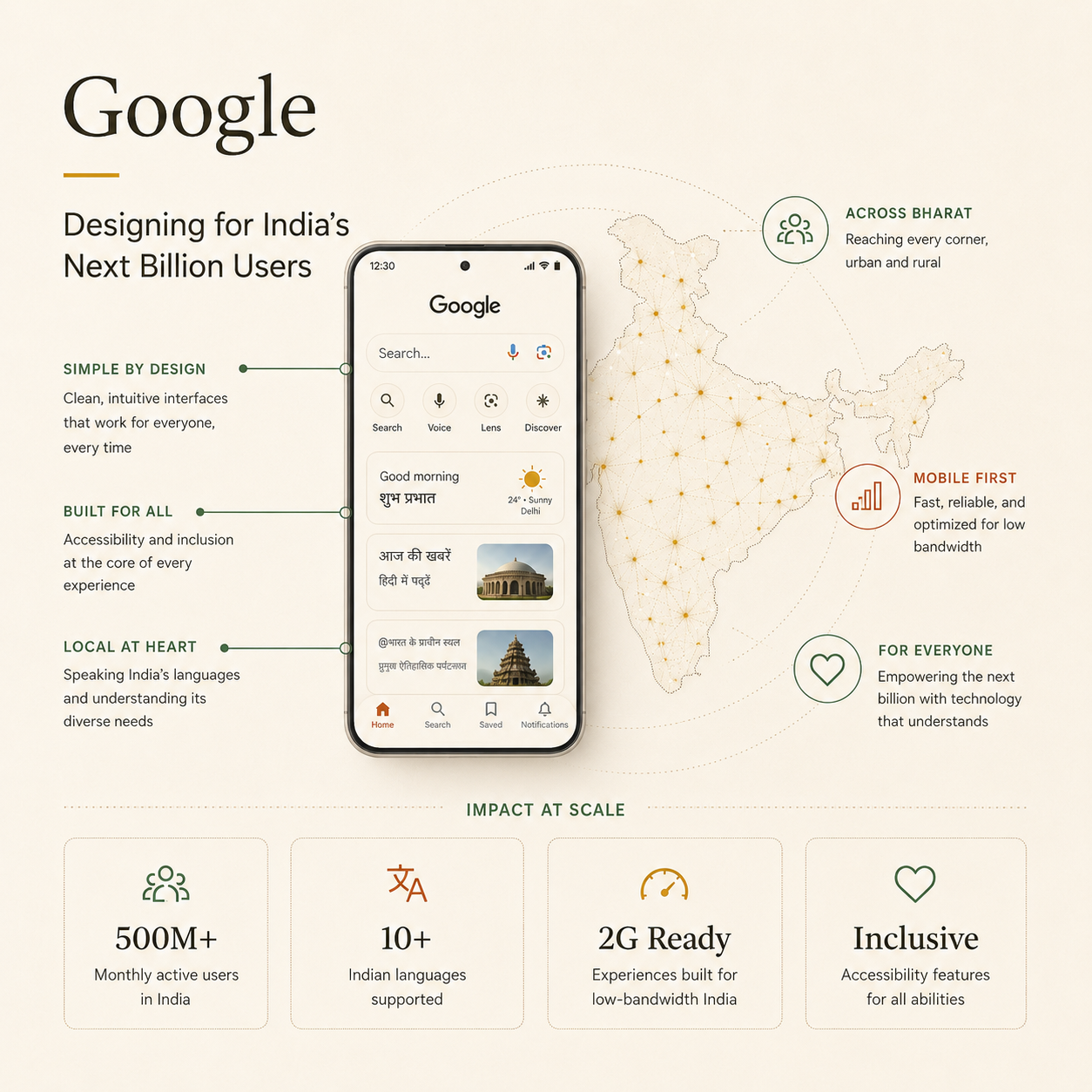
Google NBU Research
Google NBU Research
My Role Research Associate contributing to study design, moderation, note-taking, and synthesis
Why Nine Participants Exploratory research with an underrepresented user group. Depth over scale. The findings were generative, not statistically representative.
Participants 9 first-time smartphone users across 3 Tier 2 cities in India, varied literacy levels and language backgrounds
Methods Show-and-tell, contextual interviews, onboarding task observation
The Situation

First-time smartphone users in Tier 2 Indian cities across varied literacy levels and languages. Google products had been designed by teams whose assumptions about users bore almost no relation to this context. My job was to surface the gap accurately, without romanticising it.

What I Found

Three findings that shifted the framing: visual literacy is not universal — icons the team treated as obvious carried no meaning. Social help-seeking is the recovery mode — users asked the person next to them, not the interface. And apprehensiveness is independent of capability — users who could complete a task hesitated because the perceived cost of a mistake felt too high. Permission prompts were the sharpest friction point of all.

What Changed

The findings gave the design team in the US a clearer picture of how users in this context actually think. Mental models that had been assumed universal turned out to be deeply shaped by familiarity and exposure. Design iterations were made to the prototype based on what the team surfaced in the field. Copy was also revisited: the language that tested well with American users did not land the same way here, and changes were made to bring it closer to what people actually recognised and related to. It was an early lesson in what field research in an unfamiliar context can do that desk research cannot.

Three behavioural findings

The research surfaced three behavioural barriers for first-time smartphone users: uncertainty around voice input, hesitation with English-first interaction patterns, and low confidence during onboarding moments.

01
Visual literacy is not universal

Icons the team treated as intuitive shortcuts carried no meaning for users who had not been exposed to the visual conventions they were built on.

02
Social help-seeking is the recovery mode

When users were stuck, they did not explore or guess. They asked the person next to them. Onboarding designed for individual discovery had not accounted for how these users actually learned.

03
Apprehensiveness is independent of capability

Users who could complete a task would still hesitate, because the perceived cost of making a mistake felt too high. Permission prompts were the sharpest expression of this anxiety.

"Sometimes the failure is in the researcher's frame, not the product's design. Cross-cultural research teaches you to tell the difference, if you are paying attention."

9Participants
3Tier 2 Cities
3Core Findings That Shifted the Brief
2017First Year in UX Research
What I am looking for

A seat at the table where
strategy gets made.

Nine years in, I know the difference between a researcher who runs good studies and one who changes what gets built. I have worked where there was no infrastructure and built it. I have worked where no prior research existed and established the evidence base. I am also paying close attention to what AI is doing to user behaviour itself, not just to research workflows. The users I have spent nine years studying are changing how they behave, and AI is a significant part of why. That feels like the most interesting research problem of the next few years.

Why This Move, Why Now

Operating as the sole researcher across a large product portfolio, I functioned as the de facto owner of research direction for years: identifying gaps, initiating projects without a brief, and making calls that changed roadmaps. I am now looking for a role where that instinct is the formal scope, not a side effect of being the only researcher in the room. Mixed research and strategy, with cross-functional influence built in from the start.

LocationBangalore, India
Open ToGlobal Opportunities